
AI usage & the token allowance
The token allowance caps what the platform pays for, not what you may use. What counts, how to read the bar, what happens when you hit it, and what became of Openbook's credits.
Openbook does not meter its own AI. Every model call — the assistant, the build agent, a workflow, the concierge, an image, an embedding — goes through the Vibeforce account service, which writes down what it cost as the tokens are spent and refuses a call the platform is no longer willing to pay for.
That gives one number instead of three, and it is the same number in Openbook, Madebook and Vibeforce.
If you are here looking for credits, they are gone and your balance was not. Skip to What happened to credits.
The allowance caps what the platform pays for
This is the one sentence the rest of the page hangs off, and it is not the same as "what you are allowed to use".
Your organization is in one of two modes, set on the organization's AI self hosted page at your Vibeforce account (see AI configuration):
| Managed by Vibeforce | Self hosted | |
|---|---|---|
| Whose key runs the model | The platform's | Your organization's own |
| Who pays the provider | The platform | You, directly |
| Metered against the allowance | Yes | Recorded, but counted as zero |
| Can be refused for being over | Yes | Never |
A self-hosted organization costs the platform nothing, so there is nothing for the platform to cap. Its runs are still written down — you can see what it spent — but no figure it reaches will ever stop it. A managed organization runs on the platform's key, and the allowance is how much of that the platform will carry.
Neither mode falls back to the other. Running out in managed mode does not quietly start spending your own key, and a broken self-hosted key does not quietly start spending the platform's.
The allowance is per account, and shared
The allowance belongs to an account — one person's Vibeforce login — and it is charged to the owner of the organization. This is exactly how storage works, and for the same reason: there is one account service behind all three products.
So:
- Every organization that account owns draws on the same number.
- Openbook, Madebook and CodeBook draw on the same number. Tokens spent in another product move the same bar.
- Whoever is doing the work, it is the owner's allowance that is spent — not the member's.
The default allowance is 1,000,000 tokens per window unless a platform admin has changed it, or has set a different figure for that one account.
What counts as a token
For a managed run, everything the call actually consumed:
- fresh input — the part of the prompt the provider processed from scratch,
- output — what the model wrote back,
- cached input — counted in full, not at a discount.
Cached input counting in full is deliberate. The allowance is a budget of work, and someone watching the bar should not need to understand a provider's cache pricing to predict when it will move. The three figures are stored separately on every run, so what counts can change later without rewriting what already happened.
A generated image counts as a flat number of tokens — 10,000 by default, set by a platform admin. An image is not made of tokens, so this is a conversion rate rather than a measurement: roughly what a mid-tier chat model charges for the same money as a standard 1024×1024 picture.
A self-hosted run is recorded with zero billed tokens. Its real token counts are kept and reported separately, so you can see what your own key is doing.
Windows, not a monthly reset
Nothing resets. Your usage is the sum of what was recorded since the current window began, and the window is worked out from the period every time anyone asks.
- Monthly means the UTC calendar month — the 1st, because that is what "monthly" means to a person reading an invoice.
- Weekly means seven-day blocks counted from a fixed anchor, set to the most recent UTC Monday when an admin chooses weekly.
Two consequences worth knowing:
- Last window's figure stays readable. Nothing was zeroed, so "what did we use last month" is still an answerable question, and the bar shows it.
- Changing the period changes only what the window means from then on. Everything already recorded keeps the window it actually fell in.
The bar on the AI page
The organization's AI self hosted page at your Vibeforce account ends with a Usage card:
- Tokens used — N of M tokens used this month (or week): the owner's managed total for this window, against the allowance, with the date it resets — the day the window ends and the count starts again from nothing. Carried-over credit, if any, is named beside it.
- This organization, by product — the managed tokens Openbook, Madebook and CodeBook each spent in this organization, with their run counts.
- On the organization's own keys — what ran in Self hosted mode and on Members' personal keys, shown beside the bar and never added into it. Adding the two together would draw a bar that refuses at the wrong moment.
In self-hosted mode the card says plainly that the organization's runs are recorded but never metered against the platform allowance.
Any member of the organization can read this card. Only an owner or an admin can change the configuration.
Openbook's own AI page, which drew this bar, is gone. The bar is at the account service with the rest of the organization's AI now; inside Openbook, the meter below is the way to see it.
The meter in your account menu
You do not have to open a settings page to see where you stand. The same figure sits at the foot of the account menu, under Sign out, on every page:
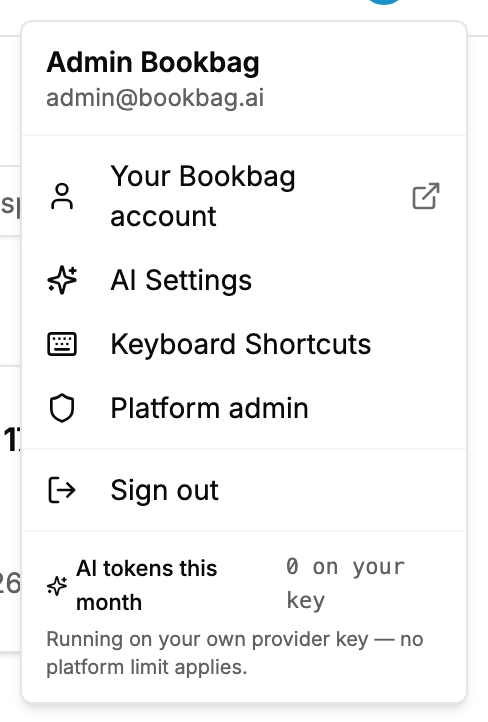
It reads AI tokens this month with your used-against-allowance figure and a thin bar, and links to the organization's page at your Vibeforce account. In self-hosted mode it says what ran on your own key and notes that no platform limit applies. The meter is in the same place in Madebook and CodeBook, because the number behind it is one number for all of them.
Once the allowance is spent, every AI button in the product becomes disabled rather than hidden, and hovering one tells you why. The intent is that you find out by reading, not by pressing something and watching it fail.
The used/limit pair is the owner's account-wide figure even though you are looking at one organization — it can be non-zero because of work done somewhere else entirely, in another organization or another product.
When you hit the limit
A managed run that starts over the allowance is refused before any provider is called. The model is resolved from the account service's own tables, so nothing has been spent proving the point and nothing will be.
The refusal is one sentence, and Openbook shows it exactly as it arrives:
Token allowance reached (1,020,500 of 1,000,000 tokens used this month). It turns over on 1 October 2026. An organization running on its own provider key (self-hosted mode) is not metered at all, or a platform admin can raise this account's allowance.
It names the figures, the date it turns over, and the two ways out. Nothing rewrites it, because nothing else knows those numbers.
What that looks like in practice:
- A build agent run stops. It is not retried — a second attempt gets the identical answer from the identical tables, so retrying only writes the same sentence onto the timeline three times. Work already committed is kept.
- The assistant, a workflow and the concierge answer with the sentence instead of a reply.
- Everything that is not a model call is untouched. Rooms, boards, cards, documents, search, chat between people, files and repositories all work normally.
The refusal is written down as a void row on the account service's ledger, with the reason token_limit. "Why did the agent stop at four o'clock" is only answerable if the refusal was recorded.
The two ways out
- Move the organization to its own provider key. On the organization's AI self hosted page at your Vibeforce account, switch to self hosted and add a key, and nothing in that organization is metered or capped again — the provider bills you directly. An owner or an admin can do this without asking anyone.
- Ask a platform admin to raise the account's allowance. They set it per account, at the account service, not in Openbook.
Waiting also works: the window turns over on the date the sentence names.
One run can cross the line. The check asks whether the allowance is already spent, not whether the run you are starting will fit — nobody knows what a completion will cost before it runs, and guessing would refuse work that would have fitted. So a single run may finish slightly over. The row that records it is exactly what refuses the next one.
Local guardrails, which are not the meter
Two settings inside Openbook bound a run before the account service ever needs to. Both are in tokens, both are guardrails, and neither charges anything.
A build room's token budget per run. On the room's settings: input, output and cached, counted the way the allowance counts them. A run that reaches it stops at a turn boundary and keeps its work, saying so on the timeline. 0 means no cap. See the build agent.
Per-workspace agent gates. On Openbook's organization Settings page, under Agent gates, an owner or an admin can set, per workspace:
- Block agent teams — the workspace's agent rooms fall back to the single in-process agent rather than the multi-agent team backend.
- Judges at least — a minimum number of verification passes, 0 to 3, on every run in that workspace.
- Max tokens/run — an upper bound, up to 10,000,000, on what one run may use.
0means no ceiling.
Gates only ever tighten what a room already allows. A gate cannot grant a room more than its own settings do, and a gate that fails to load never blocks a run — it applies on the next one.
This is what makes it safe to roll the agent out unevenly: generous in the workspace that lives in build rooms, capped in workspaces still evaluating. See Organization pages & settings.
A retried request is charged once
Every run is recorded under a key, and Openbook passes a stable one for each step of a conversation. A retried HTTP request re-asks the model but is charged once. A genuinely new step gets a new key, so this is not a way to make repeated work free.
What happened to credits
Openbook used to keep its own credit ledger: a balance per organization, a monthly top-up, an allowance that came from the plan. All of it is gone. Tokens are metered once, where they are spent, and Openbook is not the place that does it.
Your balance was not thrown away. Before the ledger was retired, every organization's remaining balance was carried across to the account service as a one-off opening adjustment at one credit to one thousand tokens — the rate Openbook itself charged at.
It is carried as headroom in the current window, not as a raised allowance, and the distinction matters:
- An allowance is a recurring promise: this much, every window, for ever.
- A balance was finite and was granted once.
Turning the second into the first would quietly invent a subscription nobody was sold. So the carried balance lowers what counts as used, once, in the window it landed in.
In the figures the account service reports, a carried balance appears as credit; used never goes below zero; and remaining is the allowance plus that credit.
What that looks like on the bar. The meter in Openbook's account menu draws
usedagainstlimit. While carried headroom is still covering your usage,usedreads 0 and the bar sits empty — the meter does not name the credit or show the extra room above the allowance (the Usage card at the account service names it as tokens of credit). The headroom is real and is being spent; the bar simply starts moving once it is gone. If you carried a large balance, expect the bar to stay at zero for a while and then behave normally.
Other things that went with the ledger:
/admin/creditsno longer exists. The platform admin area now links out to the account service's AI tokens page instead.- Plans carry no AI allowance. Free, Pro and Business differ on members, workspaces and features. None of them sets a token figure, because a per-plan number could only be a second opinion about a budget the account service owns. See Plans.
- A run is no longer "metered but not charged". Everything is metered, and a managed run is charged against the allowance — including the build agent, the assistant and workflows, which never were before.
- The per-run cap is in tokens now. An older room whose cap was in credits was converted at one thousand tokens to the credit.
Where a platform admin changes it
At the Vibeforce account service, on its AI tokens page (/admin/tokens). From Openbook's own /admin, the sidebar's AI tokens ↗ under "The platform brain" is the door out to it.
There a platform admin sets:
- The default allowance — the most one account may use per window, for everybody without an exception.
- Whether it turns over monthly or weekly, with the note that changing it changes what the window means from then on and moves nothing already recorded.
- What a generated image costs in tokens.
- A per-account exception — find someone by the email they sign in with, give them a different number, and leave a note saying why. Clearing the exception puts them back on the default.
The same page shows the platform's own totals for the window — billed, accounts spending, what ran on other people's keys, and how many runs were refused — and the ledger itself, one row per run, never edited and never deleted.
Openbook's own /admin still has Agent activity, which shows what Openbook measured on each run. That is this product's receipt, not the bill; the bill is at the account service.
Keeping usage healthy
- In self-hosted mode, watch your provider's dashboard. The allowance will not show you that spend, because the platform is not paying it.
- Set a per-run token budget in rooms with heavy agent use. It is the cheapest insurance against a pathological run, and it is the only thing bounding a scheduled workflow nobody is watching.
- Prefer focused runs. A run scoped to one story sends far less context than a sprawling "fix everything" session.
- Check the bar's previous-window figure for trend. Two windows is enough to see a habit forming.
- If you are the owner of several organizations, remember the bar is showing you one number across all of them.
Where to go next
- The mode switch and what each side means: AI configuration
- The same idea with bytes as the unit: Storage and files
- What the build agent does with a token budget: the build agent
- The platform admin's side: Platform administration